Wednesday, February 22, 2017

Troubleshooting Firebird Database

Note:  I will be using the employee database(/opt/firebird/examples/empbuild/employee.fdb) which is available by-default with the Firebird 2.5.7  in this post.

How to connect to a Firebird Database and test (using command-line)


1. Go to /opt/firebird/bin directory.
2. Run ./isql (Command-line tool for Firebird)
udara@Razorx1:/opt/firebird/bin$ ./isql
Use CONNECT or CREATE DATABASE to specify a database
SQL>
3. Run connect "/opt/firebird/examples/empbuild/employee.fdb"
SQL> connect "/opt/firebird/examples/empbuild/employee.fdb"
CON>
4. Provide the user/password to connect, note the semicolon (;) at the end.
CON> user 'SYSDBA' password 'admin';
Database:  "/opt/firebird/examples/empbuild/employee.fdb", User: SYSDBA
SQL>

5. Run the intended query,
SQL> select * from employee;

 EMP_NO FIRST_NAME      LAST_NAME            PHONE_EXT                 HIRE_DATE DEPT_NO JOB_CODE JOB_GRADE JOB_COUNTRY                    SALARY FULL_NAME                            
======= =============== ==================== ========= ========================= ======= ======== ========= =============== ===================== =====================================
      2 Robert          Nelson               250       1988-12-28 00:00:00.0000  600     VP               2 USA                         105900.00 Nelson, Robert                       
      4 Bruce           Young                233       1988-12-28 00:00:00.0000  621     Eng              2 USA                          97500.00 Young, Bruce                         
      5 Kim             Lambert              22        1989-02-06 00:00:00.0000  130     Eng              2 USA                         102750.00 Lambert, Kim                         
      8 Leslie          Johnson              410       1989-04-05 00:00:00.0000  180     Mktg             3 USA                          64635.00 Johnson, Leslie                      
      9 Phil            Forest               229       1989-04-17 00:00:00.0000  622     Mngr             3 USA                          75060.00 Forest, Phil                         
     11 K. J.           Weston               34        1990-01-17 00:00:00.0000  130     SRep             4 USA                          86292.94 Weston, K. J.                        
     12 Terri           Lee                  256       1990-05-01 00:00:00.0000  000     Admin            4 USA                          53793.00 Lee, Terri  
 

How to enable trace configuration

1. Open /opt/firebird/fbtrace.conf in your favorite text editor and update relevant configuration.

How to trace the database

1. Go to /opt/firebird/bin directory.
2. Run ./fbtracemgr with proper parameter set.
udara@Razorx1:/opt/firebird/bin$ ./fbtracemgr -SE service_mgr -START -NAME fire -CONFIG ../fbtrace.conf -USER SYSDBA -PASS admin

Sample trace output for the select * from employee;query.

2017-02-22T11:58:23.2200 (1980:0x7f85df7ae678) TRACE_INIT
    SESSION_4 fire
   

2017-02-22T11:58:23.2210 (1980:0x7f85df7ae678) PREPARE_STATEMENT
    /opt/firebird/examples/empbuild/employee.fdb (ATT_63, SYSDBA:NONE, NONE, TCPv4:127.0.0.1)
    /opt/firebird/bin/isql:7445
        (TRA_264, READ_COMMITTED | NO_REC_VERSION | WAIT | READ_WRITE)

Statement 128:
-------------------------------------------------------------------------------
select * from employee
      0 ms

2017-02-22T11:58:23.2210 (1980:0x7f85df7ae678) FREE_STATEMENT
    /opt/firebird/examples/empbuild/employee.fdb (ATT_63, SYSDBA:NONE, NONE, TCPv4:127.0.0.1)
    /opt/firebird/bin/isql:7445

Statement 127:
-------------------------------------------------------------------------------
select * from employee

2017-02-22T11:58:23.2220 (1980:0x7f85df7ae678) EXECUTE_STATEMENT_START
    /opt/firebird/examples/empbuild/employee.fdb (ATT_63, SYSDBA:NONE, NONE, TCPv4:127.0.0.1)
    /opt/firebird/bin/isql:7445
        (TRA_263, CONCURRENCY | WAIT | READ_WRITE)

Statement 128:
-------------------------------------------------------------------------------
select * from employee

2017-02-22T11:58:23.2260 (1980:0x7f85df7ae678) CLOSE_CURSOR
    /opt/firebird/examples/empbuild/employee.fdb (ATT_63, SYSDBA:NONE, NONE, TCPv4:127.0.0.1)
    /opt/firebird/bin/isql:7445

Statement 128:
-------------------------------------------------------------------------------
select * from employee


Firebird trace utility

Firebird Trace utility.
Usage: fbtracemgr <action> [<parameters>]

Actions:
  -STA[RT]                              Start trace session
  -STO[P]                               Stop trace session
  -SU[SPEND]                            Suspend trace session
  -R[ESUME]                             Resume trace session
  -L[IST]                               List existing trace sessions

Action parameters:
  -N[AME]    <string>                   Session name
  -I[D]      <number>                   Session ID
  -C[ONFIG]  <string>                   Trace configuration file name

Connection parameters:
  -SE[RVICE]  <string>                  Service name
  -U[SER]     <string>                  User name
  -P[ASSWORD] <string>                  Password
  -FE[TCH]    <string>                  Fetch password from file
  -T[RUSTED]  <string>                  Force trusted authentication

Examples:
  fbtracemgr -SE remote_host:service_mgr -USER SYSDBA -PASS masterkey -LIST
  fbtracemgr -SE service_mgr -START -NAME my_trace -CONFIG my_cfg.txt
  fbtracemgr -SE service_mgr -SUSPEND -ID 2
  fbtracemgr -SE service_mgr -RESUME -ID 2
  fbtracemgr -SE service_mgr -STOP -ID 4

Firebird sample with WSO2 DSS

I'm going to provide instructions to showcase how we can use Firebird data-source with WSO2 DSS.

Note:
I will be using the employee database(/opt/firebird/examples/empbuild/employee.fdb) which is available by-default with the Firebird 2.5.7  in this post.

Following are the Firebird/JDBC driver and WSO2 DSS versions which I have tried.
  • Firebird: 2.5.X
  • JDBC Driver: jaybird-full-2.2.12
  • WSO2 DSS: 3.5.1
Steps:
  1. Download the JDBC driver for Firebird and copy into the <DSS_HOME>/repository/components/lib/ directory.
  2. Start the DSS node.(or restart if it's already started)
  3. Add a new Data Service with the following configuration.
Datasource type: RDBMS
Database Engine: Generic
Driver Class: org.firebirdsql.jdbc.FBDriver
URL: jdbc:firebirdsql://localhost:3050//opt/firebird/examples/empbuild/employee.fdb

* Provide Host, Port, Database Path, User Name, Password accordingly.

Create and test the Datasource connection.


Save and proceed next, to add the query
select EMP_NO,FIRST_NAME,
LAST_NAME,PHONE_EXT,HIRE_DATE,DEPT_NO,SALARY from employee where EMP_NO=:EMP_NO


Add Input/Output mappings accordingly.


Save and proceed next, to add the operation.


Save and finish.

Now if you go to the Home> Manage> Services> List> firebirdTest> Edit Data Source(XML Edit) you can see the following Data Service definition.

<data disableStreaming="true" name="firebirdTest" transports="http https local">
   <config enableOData="false" id="emp">
      <property name="driverClassName">org.firebirdsql.jdbc.FBDriver</property>
      <property name="url">jdbc:firebirdsql://localhost:3050//opt/firebird/examples/empbuild/employee.fdb</property>
      <property name="username">SYSDBA</property>
      <property name="password">admin</property>
   </config>
   <query id="select" useConfig="emp">
      <sql>select EMP_NO,FIRST_NAME,&#xd;LAST_NAME,PHONE_EXT,HIRE_DATE,DEPT_NO,SALARY from employee where EMP_NO=:EMP_NO</sql>
      <result element="Entries" rowName="Entry">
         <element column="EMP_NO" name="EMP_NO" xsdType="string"/>
         <element column="FIRST_NAME" name="FIRST_NAME" xsdType="string"/>
         <element column="LAST_NAME" name="LAST_NAME" xsdType="string"/>
         <element column="PHONE_EXT" name="PHONE_EXT" xsdType="string"/>
         <element column="HIRE_DATE" name="HIRE_DATE" xsdType="string"/>
         <element column="DEPT_NO" name="DEPT_NO" xsdType="string"/>
         <element column="SALARY" name="SALARY" xsdType="string"/>
      </result>
      <param name="EMP_NO" sqlType="STRING"/>
   </query>
   <operation disableStreaming="true" name="getEmp">
      <call-query href="select">
         <with-param name="EMP_NO" query-param="EMP_NO"/>
      </call-query>
   </operation>
</data>
How to test the data-service(Try-it tool)

Go to Home> Manage> Services> List> firebirdTest> Try this service.

Provide the EMP_NO and press send.


Further information on query/input and output mappings/operation can be found here.

Wednesday, June 15, 2016

Controlling MeArm Robot arm from an android device

I recently bought a MeArm robot arm and assembled.


This consists of 4 servo motors to control base, shoulder, elbow and gripper. Later I found "MeArm Controller" android application and decided to configure arduino bluetooth module to complete my setup.

Following is the breadboard view of my configuration.


I found it bit hard to configure the android app for the first time hence decided to note down configuration steps below.

1. Turn bluetooth on and open the application.


2. Press the settings icon (triangle just below Reset button). This should take you to the following screen.


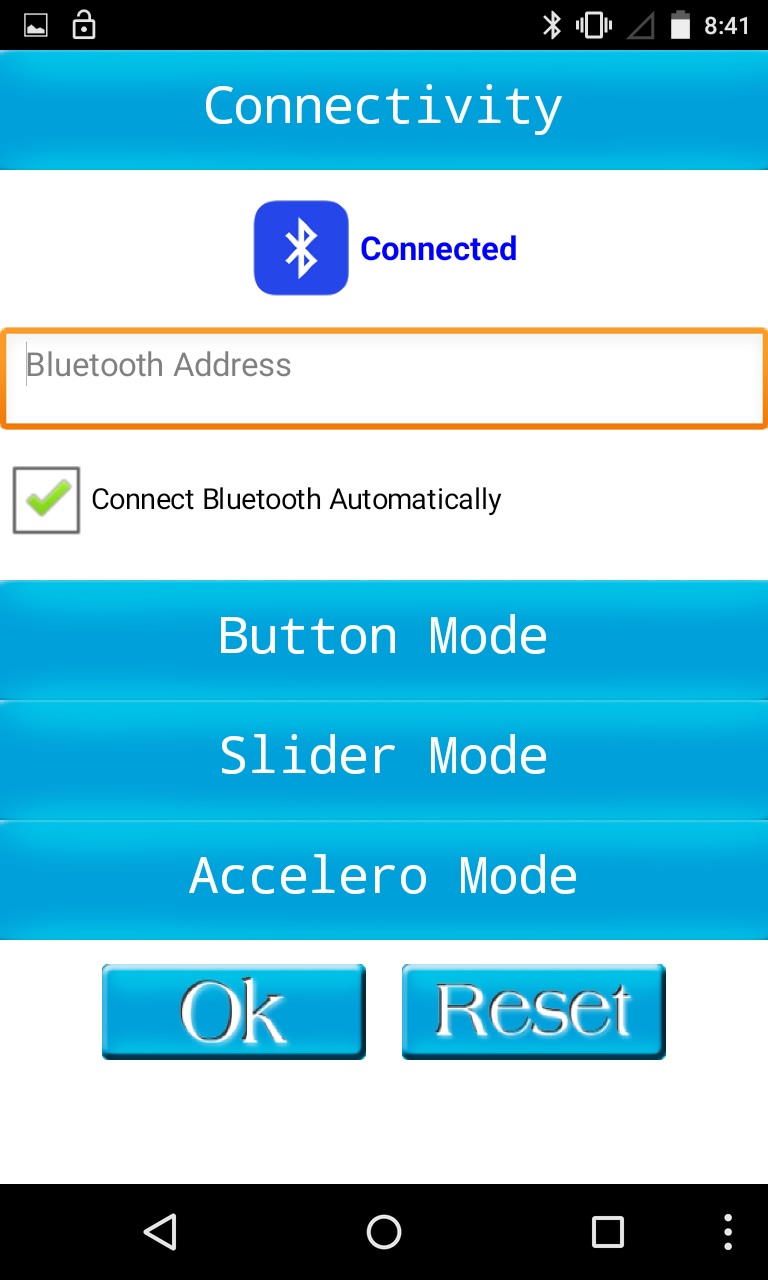
3. Press the Connectivity button.


4. Then tap on the bluetooth icon and select the correct address.
Now you should get a screen saying connected :)


5. Select the slider mode then provide Servo IDs.


6. Press OK and you should get a screen similar to the following, where you have controls to the 4 servo motors.


Here is my messy robot arm config,


Arduino sketch: (Credit to the original creator- I have only  modified baudrate for the bluetooth module)


Wednesday, June 8, 2016

Measure performance of a given JavaScript code

console.time("for loop");
for(var i=0; i < 100; i++){
  console.log("i is: " + i);
}
console.timeEnd("for loop");

Wednesday, April 27, 2016

How to add git branch name to the command line

How many times you run the git branch command to find out which branch you in?

Following will help you to overcome above hassle and have a quick glance at your branch name.


1. Open /home/<USER>/.bashrc file.
2. Add following to the bashrc, save and exit.
parse_git_branch() {
 git branch 2> /dev/null | sed -e '/^[^*]/d' -e 's/* \(.*\)/(\1)/'
}
if [ "$color_prompt" = yes ]; then
 PS1='${debian_chroot:+($debian_chroot)}\[\033[01;32m\]\u@\h\[\033[00m\]:\[\033[01;34m\]\w\[\033[01;31m\]$(parse_git_branch)\[\033[00m\]\$ '
else
 PS1='${debian_chroot:+($debian_chroot)}\u@\h:\w$(parse_git_branch)\$ '
fi
unset color_prompt force_color_prompt
3. Open a new terminal window and browse your git repo :)

Friday, April 22, 2016

First shot with the AF_Motor Library

I had to use an Arduino motor shield as a HAT on a uno board, powered by four 1.2V rechargeable batteries, to power-up two DC motors. ( Yes, juice provided by arduino is not enough to power two motors )


Since this is my first library usage, I had to find out how to install a library in my workspace and decided to note the steps as a reference here.

Howto Install the Library-

1. Download the library, in my case AF_Motor from
https://github.com/adafruit/Adafruit-Motor-Shield-library/zipball/master.

2. Unzip and rename to motorsheild and copy in to the sketchbook libraries directory. (Create libaries directory, if not exists)
Eg:- /home/udara/sketchbook/libraries/ directory.

Why Rename: Default library name(adafruit-Adafruit-Motor-Shield-library-89a0973), contains hyphen(-) characters which causes library pickup issue during IDE startup.


3. Start/Restart IDE.

Hint: Browse File> Examples, you should see motorsheild sample sketches.

Sunday, April 3, 2016

how to resolve "M: bad interpreter" while working with bash scripts

This is a common problem if you try to port a script created in windows environment to unix,
 /bin/bash^M: bad interpreter: No such file or directory
How to solve this,

run dos2unix <BASH_SCRIPT>
Eg:- dos2unix run.sh

For further information: http://www.linuxcommand.org/man_pages/dos2unix1.html